
Introduction
In my previous post, AI Assistant for Our Blog Writing Process , I introduced the assistant we built to help with our blog writing. It has two pieces: an MCP (Model Context Protocol) server that holds the source of truth for our two blogs, and a Claude Code plugin that turns that information into workflows for suggesting topics, planning a post, drafting it and reviewing it.
That post was about deciding what to build. This one is about building it. We’ll go through the ingestion pipeline that gets our posts into a database, the embeddings that make the corpus searchable by meaning, the MCP server that exposes all of it, and the plugin that packages the workflows on top.
The stack
The pipeline and the server are one Python application, deployed to a single Heroku dyno:
- FastAPI for the web application
- FastMCP for the MCP server
- SQLAlchemy and Postgres for storage
pgvectorfor the embedding column and similarity queries- Voyage for the embeddings themselves
Semantic search is a part of the work here, I won’t cover the details of embeddings, cosine distance, and why use cosine instead of inner product or Euclidean distance in this post. The Semantic Search with Sequel and pgvector covers all of that. The stack there is Ruby, but the concepts are the same.
Getting the data in
The blogs are the source of truth, not the database. Both of them are Jekyll sites, which means every post is a markdown file with YAML front matter sitting in a GitHub repository. The pipeline’s job is to mirror that into something queryable.
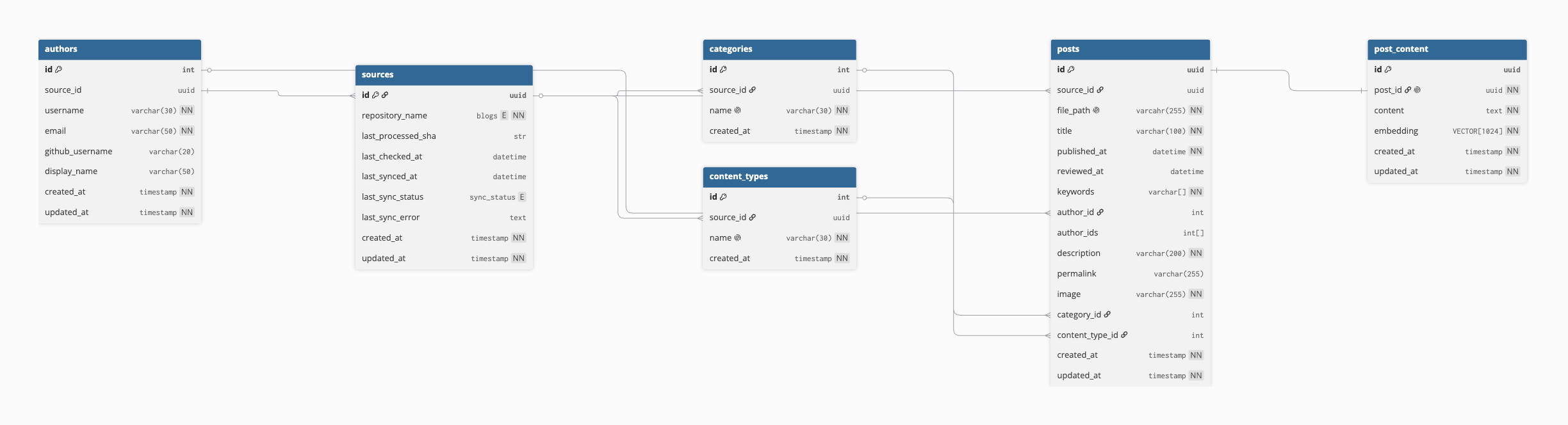
Posts and their content are separate tables. The content table is the one that carries the embedding:
class PostContent(Base):
    __tablename__ = "post_content"

    id: Mapped[UUID] = mapped_column(primary_key=True, default=uuid4)
    post_id: Mapped[UUID] = mapped_column(
        ForeignKey("posts.id", ondelete="CASCADE"),
        nullable=False,
        unique=True,
    )
    content: Mapped[str] = mapped_column(nullable=False)
    embedding: Mapped[Sequence[float]] = mapped_column(VECTOR(1024), nullable=False)
VECTOR(1024) comes from pgvector.sqlalchemy , and 1024 is the dimension of the Voyage model we use. Splitting content off from metadata keeps the posts table small enough to query comfortably, since most of the tools only need metadata.
The posts table itself is mostly ordinary columns, with two constraints worth pointing at:
class Post(Base):
    __tablename__ = "posts"

    id: Mapped[UUID] = mapped_column(primary_key=True, default=uuid4)
    source_id: Mapped[UUID] = mapped_column(ForeignKey("sources.id", ondelete="CASCADE"), nullable=False)
    file_path: Mapped[str] = mapped_column(String(255), nullable=False)
    title: Mapped[str] = mapped_column(String(100), nullable=False)
    published_at: Mapped[datetime] = mapped_column(DateTime, nullable=False, index=True)
    keywords: Mapped[list[str]] = mapped_column(MutableList.as_mutable(ARRAY(String)), nullable=False)
    author_id: Mapped[int | None] = mapped_column(ForeignKey("authors.id", ondelete="CASCADE"), nullable=True)
    author_ids: Mapped[list[int] | None] = mapped_column(MutableList.as_mutable(ARRAY(Integer)), nullable=True)

    __table_args__ = (
        UniqueConstraint("source_id", "file_path", name="uq_posts_source_file_path"),
        CheckConstraint("author_id IS NOT NULL OR author_ids IS NOT NULL", name="ck_author_id_or_author_ids"),
    )
That listing is trimmed, the real model has a few more columns. The unique constraint is on source plus file path rather than file path alone, because two blogs can quite happily have a post with the same filename. The check constraint encodes an editorial rule: a post has either one author or a list of them, never neither. title is String(100) for the same reason, because that fits the length limit our blogs enforce comfortably.
Front matter parsing uses the python-frontmatter library, and the pipeline normalizes the metadata schema where the two blogs disagree, so every consumer downstream sees one interface and doesn’t need to worry about which blog it’s looking at:

Re-reading four hundred posts on every sync would be wasteful, so the pipeline works from commit SHAs instead. It stores the SHA it last processed, asks GitHub what changed between then and now, and acts on the file statuses:
added = {file.filename for file in post_files if file.status == GitHubFileStatus.ADDED}
removed = {file.filename for file in post_files if file.status == GitHubFileStatus.REMOVED}
updated = {file.filename for file in post_files if file.status == GitHubFileStatus.MODIFIED}

if added:
    added_files = [
        self._github_service.get_contents(file_name=filename, ref=current_sha)
        for filename in added
    ]
    self._add_posts(added_files=added_files)

if removed:
    self._repos.post_repo.bulk_delete(removed)

if updated:
    updates = self._updated_posts(
        current_sha=current_sha,
        last_processed_sha=last_processed_sha,
        updated=updated,
    )
    self._repos.post_repo.bulk_update(updates)
When there is no last processed SHA, which is to say on the very first run, it walks the whole repository instead. Updates are handled by fetching both versions of the file, diffing the parsed front matter key by key, and only writing what actually changed:
changes = {
    key: value
    for key, value in current_post_metadata.items()
    if previous_content_metadata.get(key) != value
}
if changes:
    post_update.metadata = changes

if current_post.content != previous_content.content:
    post_update.content = current_post.content
That last check is what keeps the embedding bill down. If a post’s body is untouched, there is no reason to re-embed it, so a typo fix in the front matter costs nothing.
Voyage embeddings
Anthropic doesn’t offer its own embedding models, it recommends evaluating embedding vendors to decide on the best one for your use case. Voyage AI features prominently and its models are documented as working particularly well with Claude’s retrieval systems, so that is the provider we used.
Embedding a post is a single call, and the text we embed is the title glued to the body:
embeddings = self._voyage_service.embed_many(
    text=[
        f"{post['metadata']['title']} - {post['content']}"
        for post in new_posts
    ],
)
The title goes in because it is often the most concentrated description of what a post is about, and dropping it loses information that the body sometimes never states outright.
The service wrapping Voyage is small, and the important part to pay attention to here is the type on input_type:
EmbeddingInputType = Literal["document", "query"]

BATCH_SIZE: int = 50


class VoyageService:
    def embed_one(
        self,
        text: str,
        input_type: EmbeddingInputType = "document",
    ) -> Sequence[float]:
        embeddings = self.client.embed(
            texts=[text],
            model=settings.EMBEDDING_MODEL,
            input_type=input_type,
        )
        return embeddings.embeddings[0]

    def embed_many(
        self,
        text: Sequence[str],
        input_type: EmbeddingInputType = "document",
    ) -> Sequence[Sequence[float]]:
        embeddings = []
        for batch in batched(text, BATCH_SIZE):
            embeddings.extend(self._embed_batch(batch=batch, input_type=input_type))
        return embeddings
Voyage’s models take an input_type parameter, and passing the right one is not optional if you want good results. The model embeds a short question differently from the way it embeds a long document, because those two things are asymmetric in practice: somebody typing “zero-downtime Rails upgrades” is describing what they want to find, not providing a sample of it.
That asymmetry is why we ended up with two search tools rather than one:
def search_posts(
    query: str,
    source: BlogSources | None = None,
    limit: int = _DEFAULT_SEARCH_HITS,
) -> list[SearchHit]:
    """Semantic search over published blog posts.

    query should be a short natural-language phrase describing a topic (e.g. "zero-downtime Rails upgrades").
    Omit source to search both blogs. Results are ordered by similarity score (higher = closer) and include a
    snippet; use get_post with a hit's file_path for full content.
    """
    embedding = _voyage.embed_one(text=query, input_type="query")
    with session_scope() as db:
        return PostQueryRepo(db).similar_posts(
            embedding=embedding,
            source=source,
            limit=limit,
        )


def find_related_posts(
    text: str,
    source: BlogSources | None = None,
    exclude_file_path: str | None = None,
    limit: int = _DEFAULT_SEARCH_HITS,
) -> list[SearchHit]:
    """Find published posts most similar to a full draft or document.

    Pass the entire draft (or a section) as text, unlike search_posts, which expects a short query. Use this to find
    cross-reference and internal-link candidates for a post being written or reviewed. Set exclude_file_path when the
    draft is a revision of an existing post so it doesn't match itself.
    """
    embedding = _voyage.embed_one(
        text=text,
        input_type="document",
    )
    with session_scope() as db:
        return PostQueryRepo(db).similar_posts(
            embedding=embedding,
            source=source,
            exclude_file_path=exclude_file_path,
            limit=limit,
        )
The two functions do almost the same thing and differ in three places: what they call their first parameter, the input_type they pass, and whether they can exclude a file path. search_posts takes a phrase and embeds it as a query. find_related_posts takes an entire draft and embeds it as a document, which is what you want when the question is “what have we already published that this piece should link to”.

exclude_file_path earns its place the first time you point the tool at a revision of a post that is already published. Without it the top hit is the post itself, which is correct and completely useless.
Both paths land on the same query. pgvector gives us a cosine distance operator through SQLAlchemy, so the ranking is a single order_by:
def similar_posts(
    self,
    embedding: Sequence[float],
    source: BlogSources | None = None,
    exclude_file_path: str | None = None,
    limit: int = 10,
) -> list[SearchHit]:
    distance = PostContent.embedding.cosine_distance(embedding).label("distance")
    query = (
        self._db.query(Post, PostContent, distance)
        .join(PostContent, PostContent.post_id == Post.id)
        .join(Source, Post.source_id == Source.id)
    )
    if source:
        query = query.filter(Source.repository_name == source)
    if exclude_file_path:
        query = query.filter(Post.file_path != exclude_file_path)

    rows = query.order_by(distance).limit(limit).all()
Distance is what the database returns, and similarity is what a reader wants, so the hits get built with the subtraction done for them:
SearchHit(
    **self._to_summary(post=row.Post, names=names).model_dump(),
    snippet=row.Post.description or row.PostContent.content[:300],
    score=round(1 - row.distance, 4),
)
The description or content[:300] fallback exists because our older posts predate us treating the description field as required, so a good few of them have nothing in it.
There is a cheap test for whether any of this is wired up correctly, and it is worth running before trusting the tool: paste a paragraph from a post you have already published and search for it. The post it came from should come back first. If it doesn’t, something in the chain is wrong, and it is much easier to find out that way than by squinting at similarity scores and wondering whether 0.62 is a good number.
Building the MCP server
With the data in place, the server is almost boring. FastMCP takes a name, a set of instructions, and an auth provider:
mcp = FastMCP(
    name=settings.PROJECT_NAME,
    instructions=_INSTRUCTIONS,
    auth=_build_auth(),
)
Those instructions are sent to the client, so they are the first thing a model learns about the server. They are worth writing carefully. Ours says what the two blogs are and what each one covers, because a model that knows FastRuby.io is the Rails blog and OmbuLabs.ai is the AI blog will pick the right source filter without being told every time.
Access is Google OAuth with the consent screen set to internal, which means our Workspace organization is the access list and there is no permission code of our own to maintain.
Tools are plain functions, registered one call at a time:
# Posts tools
mcp.tool(posts.list_posts)
mcp.tool(posts.get_post)

# Search tools
mcp.tool(search.search_posts)
mcp.tool(search.find_related_posts)

# Stats tools
mcp.tool(stats.get_content_stats)

# Style tools
mcp.tool(style.check_style)

# Validation tools
mcp.tool(validation.validate_post_metadata)
Resources are registered the same way, with a URI and a MIME type, and the ones with {source} in them are templates that take the blog as a parameter:
mcp.resource("blog://sources", mime_type="application/json")(resources.sources)
mcp.resource("blog://{source}/style-guide", mime_type="text/markdown")(resources.style_guide)
mcp.resource("blog://{source}/brand", mime_type="text/markdown")(resources.brand)
mcp.resource("blog://{source}/frontmatter-template", mime_type="text/markdown")(resources.frontmatter_template)
mcp.resource("blog://{source}/taxonomy", mime_type="application/json")(resources.taxonomy)
mcp.resource("blog://{source}/authors", mime_type="application/json")(resources.authors)
mcp.resource("blog://writing-principles", mime_type="text/markdown")(resources.writing_principles)
Both listings are trimmed to the blog-post surface.
The division between the two is the one design decision in here that actually mattered. Tools are things a skill can do, and resources are documents a skill can read. A skill asking “what is our house style” should get a document, not a function call that returns a paragraph at a time.
Serving it is three statements:
mcp_app = mcp.http_app(path="/mcp", stateless_http=True)

app = FastAPI(
    title=settings.PROJECT_NAME,
    lifespan=mcp_app.lifespan,
)

app.mount("", app=mcp_app)
Passing mcp_app.lifespan to FastAPI is easy to miss and the server will not work without it, because that is what starts and stops the MCP session manager alongside the app.
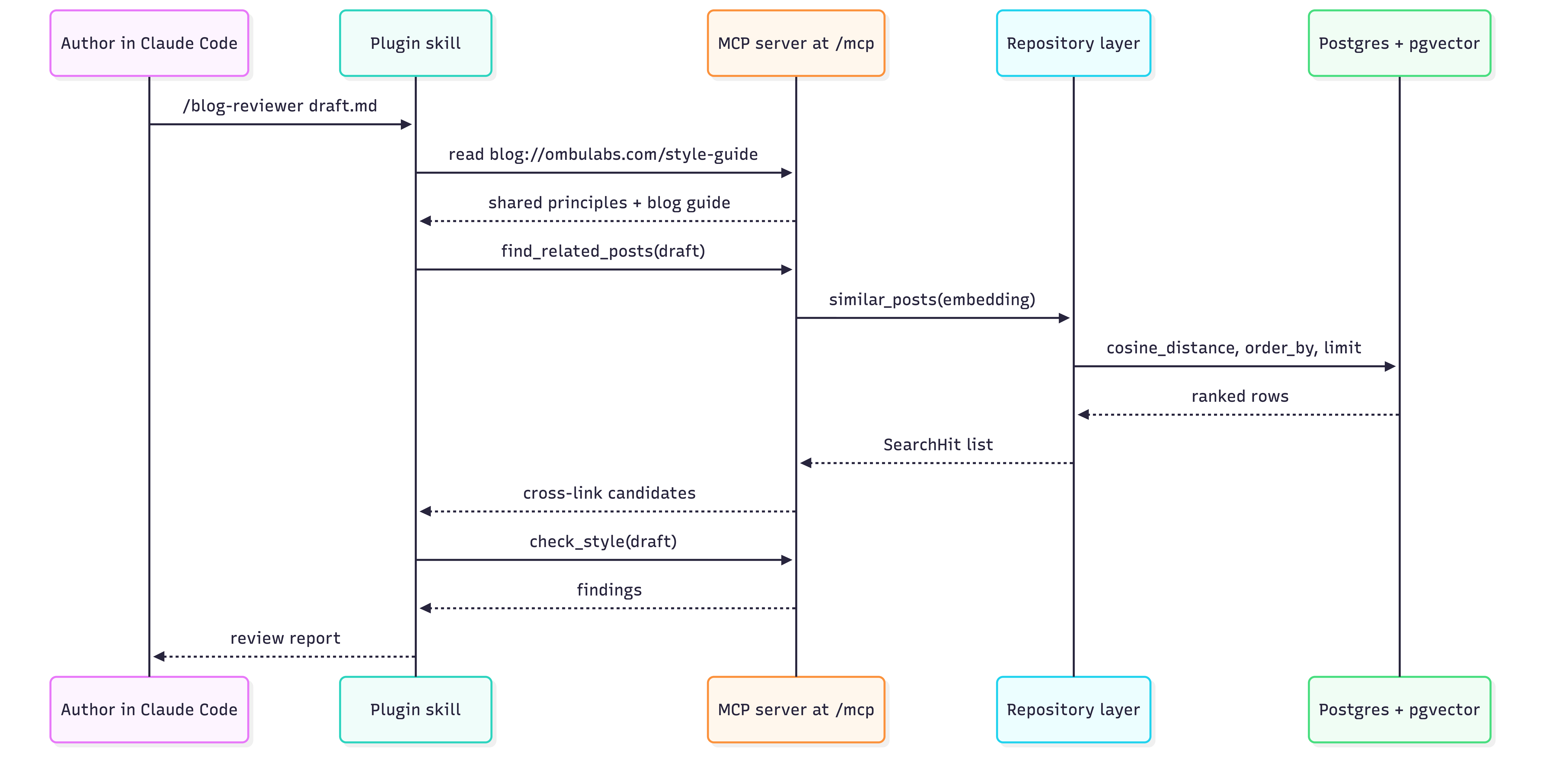
stateless_http=True is there because of a problem we ran into rather than a preference. Streamable HTTP used to keep session state on the server and hand the client a session ID. Our dynos restart daily, and every deploy restarts them too. After each restart, every connected client was holding a session ID the server had never heard of, and got a perfectly spec-compliant 404 for its trouble. The only fix on the client side is to reconnect.
The protocol has since moved the same way. The 2026-07-28 revision , published two days before this post, retires sessions and the Mcp-Session-Id header entirely, along with the initialize handshake. What was a workaround for us is now simply how the transport works, so if you are reading this some time later, treat stateless as the only path rather than as a choice.
Docstrings and type hints
FastMCP builds each tool’s advertised description from the function’s docstring, and its input schema from the type hints. That has a consequence worth sitting with: the docstring is not developer documentation. It is the interface, and its reader is a model deciding which tool to call.
Here is get_post, which is about as small as a tool gets:
def get_post(source: BlogSources, file_path: str) -> PostDetail:
    """Fetch a single blog post with its full markdown content.

    file_path is the identifier returned by list_posts. Errors if no post matches in the given source.
    """
One sentence saying what it returns, one saying where the identifier comes from, one saying what happens when it fails. That middle sentence is doing the real work. file_path is a meaningless string on its own, and without being told, a model will try to guess one. Naming the tool that produces it turns two tools into a sequence.
The same trick runs the other way in list_posts, whose docstring ends by pointing at get_post:
def list_posts(
    source: BlogSources | None = None,
    category: str | None = None,
    content_type: str | None = None,
    author: str | None = None,
    keyword: str | None = None,
    published_after: datetime | None = None,
    published_before: datetime | None = None,
    limit: int = _DEFAULT_LIMIT,
    offset: int = 0,
) -> list[PostSummary]:
    """List blog post summaries, newest first.

    Returns metadata only, no post content or body. Includes the post's url (link) that lands directly in the post's
    page in the blog.

    Filter by source (omit to search both blogs), category or content_type (exact names), author (username), keyword
    (exact match), and/or a published_after/published_before date range. Page with limit/offset. Use get_post with a
    returned file_path to fetch full post content.
    """
“Returns metadata only, no post content or body” is there to stop a model calling list_posts and then complaining that it cannot see the text. “Exact names” is there because category and content type are not free text, and a model that guesses AI instead of artificial-intelligence gets nothing back.
The type hints do the rest. That signature is what the client actually receives:
{
  "properties": {
    "source": {
      "anyOf": [{"enum": ["ombulabs.com", "fastruby.io"], "type": "string"}, {"type": "null"}],
      "default": null
    },
    "category": {"anyOf": [{"type": "string"}, {"type": "null"}], "default": null},
    "limit": {"default": 20, "type": "integer"},
    "offset": {"default": 0, "type": "integer"}
  },
  "type": "object"
}
The BlogSources enum becomes a JSON schema enum, which means the two valid blog identifiers are in front of the model rather than in a document it has to remember to read. That schema is trimmed, the real one has every filter in it.
Going back to the two search tools from earlier, this is why their docstrings look the way they do. search_posts says “query should be a short natural-language phrase describing a topic” and gives an example. find_related_posts says “pass the entire draft (or a section) as text, unlike search_posts, which expects a short query”. Each one names the other, because the failure mode is not a model that cannot use either tool, it is a model that reaches for the wrong one and gets mediocre results without ever knowing why.
When tools got picked incorrectly during testing, the fix was almost always in the description. Writing text whose audience is a model takes some getting used to, but the description is usually the cheapest thing to change.
Not every tool needs to be interesting, either. Two of ours contain no model, no embeddings, and no AI buzzwords of any kind:
mcp.tool(style.check_style)
mcp.tool(validation.validate_post_metadata)
check_style is a handful of compiled regular expressions run over a draft. validate_post_metadata is a series of if statements and a few database lookups. Neither would raise an eyebrow as a standalone script, and that is rather the point: an MCP tool does not have to be anything more than a function you already had. What the server adds is a runtime, and that turned out to matter more than expected. A script has to run somewhere, which means everyone using it needs the right language installed and the right version of the file. A tool on the server runs identically for everyone, the rules ship in the same deploy as the code that enforces them, and nobody is ever checking a draft against last month’s version.
The other thing it adds is a result rather than an opinion. Ask a model whether a draft uses banned constructions and you get a judgment, which is fine when judgment is what you need and unhelpful when it isn’t. A regex either matches or it doesn’t. validate_post_metadata goes further and checks categories, content types and author usernames against what is in the database right now, so a draft claiming a category we retired last year fails, and fails with the reason. No prompt can do that, however well written.
Testing with the Inspector
The MCP Inspector makes a server easy to test. It connects the way a client would, lists the tools and resources you have registered, and lets you call them by hand and read exactly what comes back. FastMCP ships a wrapper around it, so there is nothing to wire up separately. It runs the Inspector through npx, so you need Node available:
fastmcp dev inspector app/mcp/server.py:mcp
This gives you a client attached to your server, and three things are worth checking every time.
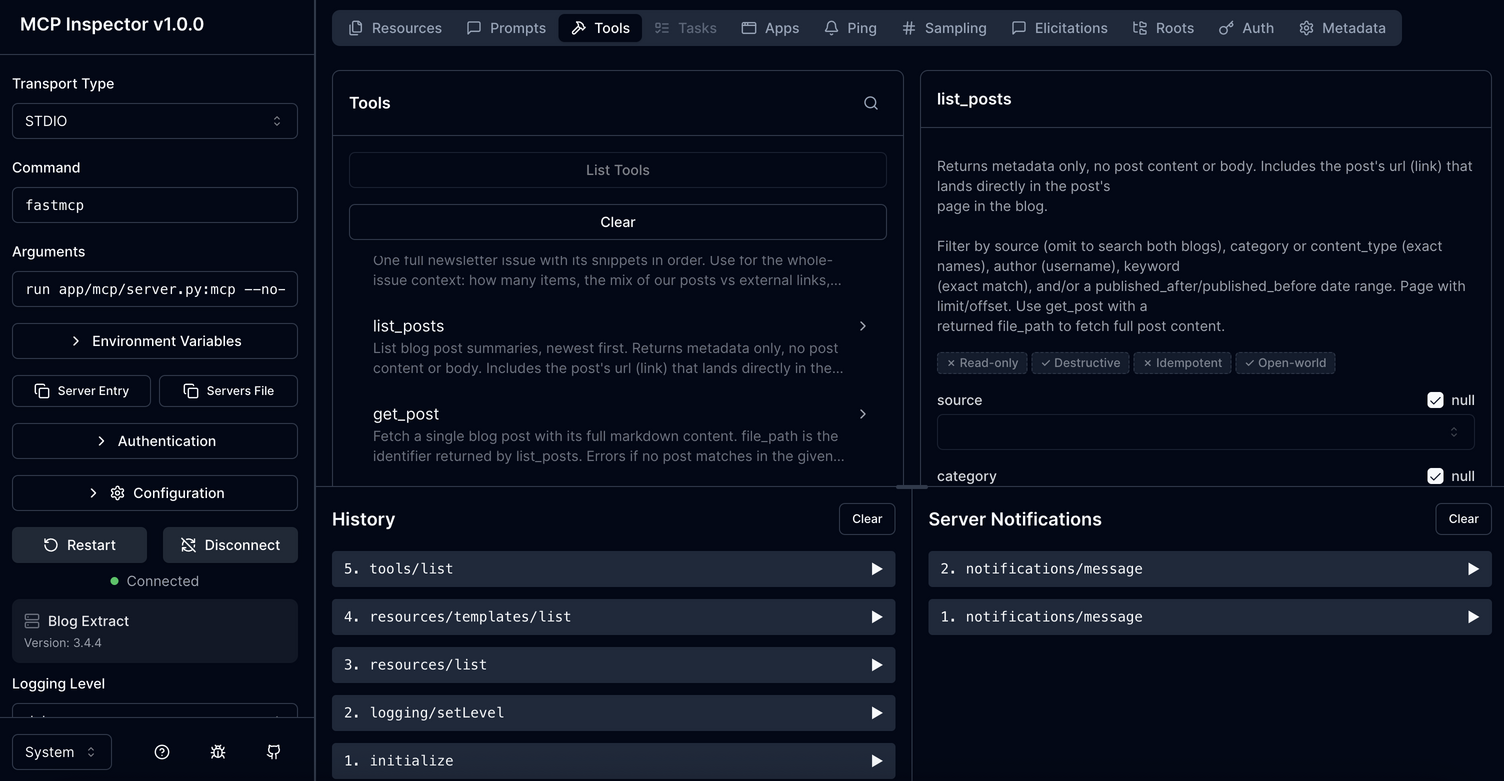
The first is whether the tools appear with the descriptions you meant. This is the only place you see your docstrings the way a model sees them, and reading them there rather than in the source is a different experience. Ours got shorter and more specific after the first look.
The second is the input schema. Enums should be enums, defaults should be the defaults you intended, and optional parameters should be genuinely optional. A BlogSources | None = None hint that quietly became a required string is not something you notice from the Python side.
The third is the output. Make sure the tool returns what you expect it to, and in the right shape. This is what a tool actually returns:
class PostSummary(BaseModel):
    source: BlogSources
    title: str
    description: str | None = None
    file_path: str
    authors: list[str]
    category: str
    keywords: list[str]
    published_at: UTCDatetime
    content_type: str
    link: str


class SearchHit(PostSummary):
    snippet: str
    score: float
    """Cosine similarity; higher = more similar."""
There are no foreign keys in there. category is a name, not a category_id. authors is a list of display names, not a list of integers pointing at another table. link is a URL the model can hand straight to the reader, assembled on the way out. All of that costs a join and saves the model from either asking a second question or, worse, guessing.
The Inspector is a mirror though, not a gate. It will happily accept some things a real client will not, so the last step is always to install the thing where it is actually going to be used and try a real task. Ours was straightforward enough: point it at a published post, ask for related articles, and see whether the answers are ones a person would have given.
The plugin
The server holds what is true about the blogs. The plugin holds how we work, and it contains no code at all. A skill is a markdown file with front matter:
---
name: blog-reviewer
description: Review a blog post draft for FastRuby.io or OmbuLabs.ai before the author opens a PR. Verifies claims (factual accuracy, overstatement, stale time-bound statements), then style and brand compliance including AI-drift patterns, then front matter validity and cross-references. Use when the user asks to review a blog post, check a draft, fact-check a post, or invokes /blog-reviewer, optionally with a file path.
---
That description is long deliberately. It is what Claude Code matches against when deciding whether the skill is relevant, so it names the artifact, both blogs, what the skill actually does and the phrasings someone might reach for. Check out our how to write a Claude Code skill post for more detail.
The body of the file is where the interesting constraint lives. Everything in a SKILL.md is loaded the moment the skill triggers, and it stays loaded. Context is finite and it is shared with the thing the author is actually working on. So SKILL.md does as little as possible. It says what the phases are, in what order, and where the detail for each one lives, for example:
| Pass | What it checks | Read |
|---|---|---|
| 1. Claims | Factual accuracy, overstatement, stale time-bound statements, dropped nuance | references/claims-review.md |
| 2. Style | Banned AI-drift patterns, style guide adherence, brand rules | references/style-review.md |
| 3. Mechanics | Front matter validity, cross-references, link verification | references/mechanics-review.md |
Each reference file gets read when its pass starts and not before. The protocol for checking claims is detailed, and none of that detail is useful while the style pass is running, so it is not in the room. The router is enough to know what to do next and where to look it up. That split pays off twice. Context stays available for the work rather than the instructions, and any phase can be rewritten by editing one file, without touching the skill that calls it.
One rule in every skill matters more than the rest, and it is the seam between the two halves of this post:
Rules are fetched, not remembered. Read
blog://{source}/style-guide,blog://{source}/brand, andblog://{source}/frontmatter-templatebefore the style and mechanics passes.
No skill contains a style rule. They fetch the resource. Change the style guide on the server and every skill picks it up on its next run, with no plugin release and nothing for anyone to install.
The plugin also ships its own .mcp.json pointing at the server, which is what turns installation into one step instead of a setup guide.
{
  "mcpServers": {
    "blog": {
      "type": "http",
      "url": "https://mcp-server.com/mcp"
    }
  }
}
Distribution is a private GitHub repository acting as its own marketplace, so access to the repo is access to the plugin and updates ride on git push.
Conclusion
Building an AI-powered solution to solve an operational workflow problem can be quite easy. None of this is fancy or unusual, the stack is as common and lean as it gets, and the plugin is just text files. Only two decisions really shaped it: what belongs on the server versus in the skills, and what gets checked by code versus by judgment. Both of those come down to knowing which parts of your own process are stable enough to encode.
If you build something like this, the part that will need looking after is not the part you would expect. The skills are easy to change and the server is small. The pipeline is what quietly decides whether any of it is useful, because a corpus that stops being current takes the tools down with it without ever throwing an error. Everything downstream trusts that data, so the ingestion side is where the attention belongs once the interesting work is done.
Need help deciding the best way to leverage your data for productivity gains? Let’s talk!